VERIFIED & BADGED
GRASSROOTS IS A
META BUSINESS PARTNER
We understand that granting access to your ad accounts is a significant decision. Here is what our Meta partnership actually means, and how you can verify it yourself, no need to take our word for it.
THE PROGRAMME
WHAT IS A BADGED META BUSINESS PARTNER?
The Meta Business Partners programme has two tiers: Member and Badged. Grassroots holds the Badged tier, the highest level in the programme.
To reach and maintain Badged status, Meta requires partners to meet minimum thresholds for ad spend, qualifying spend, and qualifying placements, alongside three ongoing compliance checks: business verification, an annual data use checkup, and an annual policy compliance self-certification.
This isn't a one-time award. Meta reviews partner status on an ongoing basis, so maintaining the badge means continuing to meet these thresholds, not just having met them once.
OUR PARTNER CENTER STATUS
BADGED & COMPLIANT
$440,234
Spend
$400,800 target threshold
71.6%
Qualifying Spend
50.0% target threshold
98.8%
Qualifying Placements
50.0% target threshold
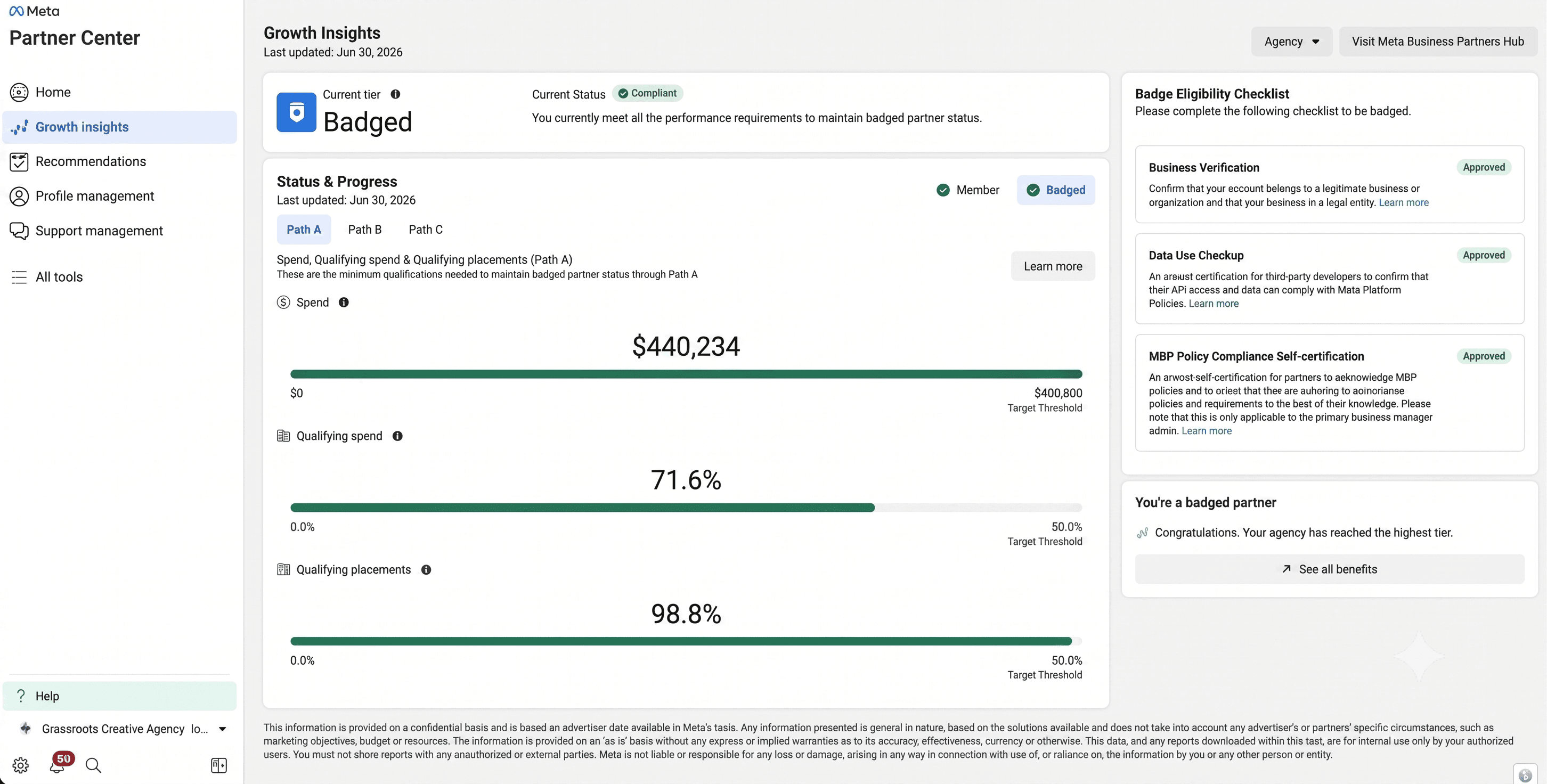
Screenshot from Meta's Partner Center, Growth Insights dashboard. Last updated 30 June 2026.
BADGE ELIGIBILITY CHECKLIST
EVERY REQUIREMENT MET
Business Verification
ApprovedConfirms the account belongs to a legitimate business or organisation, and that the business is a legal entity.
Data Use Checkup
ApprovedAn annual certification confirming API access and data handling comply with Meta's Platform Policies.
MBP Policy Compliance Self-Certification
ApprovedAn annual self-certification acknowledging Meta Business Partner policies and confirming adherence to them.
VERIFY IT YOURSELF
DON'T JUST TAKE OUR WORD FOR IT
The screenshot above is pulled directly from our own Meta Partner Center dashboard, showing our real status, spend figures and compliance checks as of the last update date shown.
If you'd like to check further, Meta's own Business Partner Directoryis the official public listing. If you're already working with us and connect an ad account, you can also see and manage our access at any time from your own Facebook Business Settings under Business Integrations, and revoke it whenever you choose.
Have any questions about our partnership status or what access we'd need for your account? Just ask, we're happy to walk through it.